

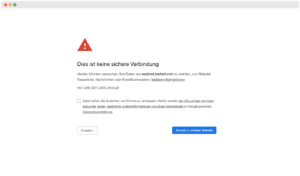
 Expired SSL certificates are not only a potential security problem, they also massively unsettle visitors to your website or online store. Most modern browsers also effectively prevent the visitor – and potential buyer – from reaching your website in the first place.
As the operator of a website or online store, it is even more annoying if an expired SSL certificate is only noticed when the first customers complain that your site is no longer accessible. The wording of some browser error messages (see screenshot on the right) also leaves a lot of room for interpretation, so that disgruntled customers could even trigger a “shitstorm” in social media.
One thing is certain: an expired SSL certificate is not only annoying, it can also cause massive sales losses or legal trouble.
Monitor SSL certificates for free
So how can you ensure that SSL certificates do not expire unnoticed? Especially with the now widespread free SSL certificates, e.g. from Let’s Encrypt, a very short validity period of e.g. 90 days goes hand in hand. Of course, providers like Let’s Encrypt offer an automatic mechanism so that certificates can renew shortly before expiration. But exactly this mechanism often causes problems on many servers. Thus, it happens that the SSL certificates expire unnoticed.
So what are the options for effectively monitoring a domain – or multiple domains – for SSL certificate issues? 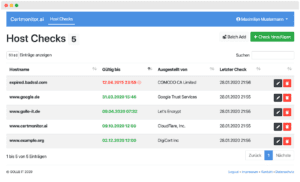
For seamless monitoring of SSL certificates, we have developed a completely free tool that can check any number of domains simultaneously for errors related to SSL encryption.
Certmonitor.ai seamlessly monitors your online store, your website or that of your customers for possible problems with the SSL certificate.
Among other things, the following are detected:
- The upcoming expiration of your SSL certificate
- Mixed content issues
- Invalid or insecure SSL certificates
- uvm.
Should one of the above. problems are detected on your web pages, you will receive an e-mail notification immediately. This allows you to react early and offer your end customers a persistently encrypted experience on your websites.
What are the alternatives?
Besides Certmonitor.ai, there are of course other ways in which you can effectively prevent your SSL certificates from expiring. In the best case, you buy only SSL certificates with a validity of 2 or even 3 years and carry the expiration date incl. timely reminder in your calendars.
Of course, there are other tools that you can use to monitor the expiration date of your certificates. Among the paid tools are e.g. Sucuri, Dotcom-Monitor or Solar Winds
Alternatively, there is a collection of free scripts on GitHub that can also monitor SSL certificates and trigger a corresponding message. We have tested a few of them here, but the benefits here are always countered by a rather costly installation, configuration and maintenance effort.